

May 24, 2026
How to Select Project Management Software for Construction

Choosing the wrong project management software for a construction project doesn’t just create minor inconveniences. It derails schedules, fragments communication between field and office teams, and quietly erodes budgets through duplicated data entry and missed deadlines. When you set out to select project management software for construction, the decision carries real operational weight. This guide walks through every stage of that decision: what to assess before you evaluate a single tool, how to compare your options methodically, what features actually matter on real job sites, and how to onboard new software without losing momentum mid-project.
Table of Contents
- Key takeaways
- How to select project management software for construction
- Evaluating and comparing your options
- Implementation best practices and pitfalls to avoid
- Features that actually move the needle
- What I’ve learned about selecting construction PM software
- How Builtblackbriar approaches project management technology
- FAQ
Key takeaways
| Point | Details |
|---|---|
| Assess needs before shopping | Map your team’s roles, critical workflows, and technical requirements before reviewing any software. |
| Prioritize field usability | Ease of use and adoption by field teams predicts success more reliably than feature count. |
| Expect fast ROI | General contractors typically see ROI within 3-6 months of adopting a purpose-built platform. |
| Avoid all-in-one assumptions | Layered, specialized tools often outperform monolithic platforms for scheduling, analytics, and cost control. |
| Standardize from day one | Setting workflows, folder structures, and permissions at the start prevents process drift across multiple projects. |
How to select project management software for construction
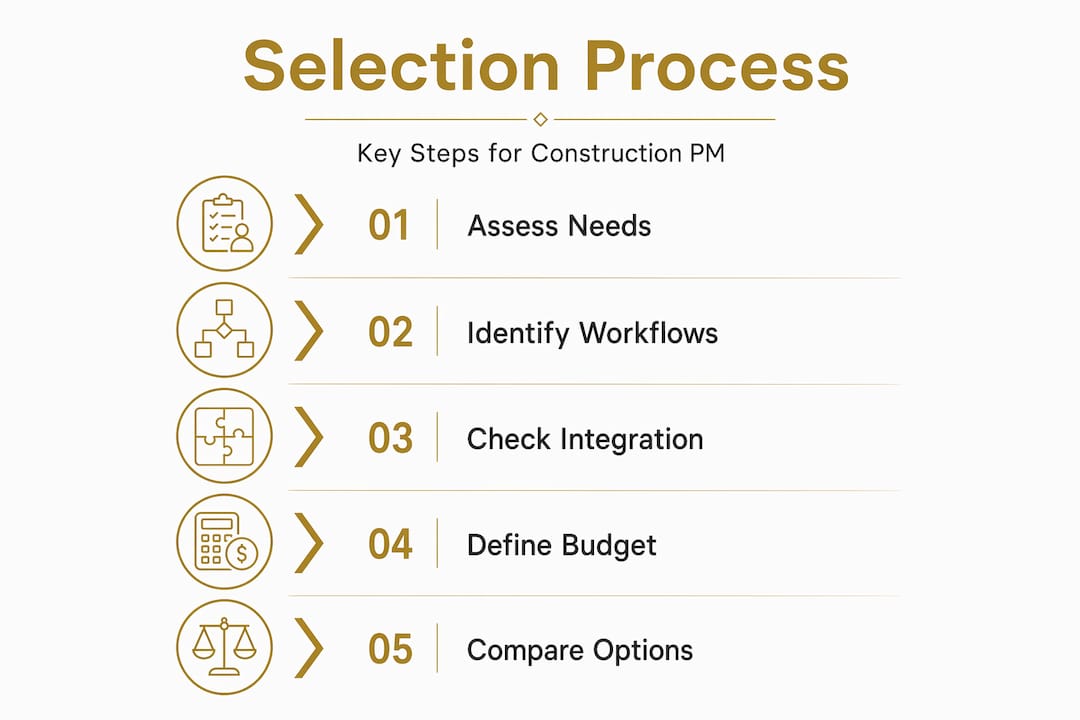
Before you open a single demo, you need a clear picture of what your organization actually requires. Skipping this step is the reason so many firms end up cycling through three tools in two years, paying for features nobody uses while missing the ones everyone needs.
Start by mapping your team structure. Construction projects involve at least three distinct user groups: office staff (project managers, estimators, accountants), field crews (superintendents, foremen, subcontractors), and clients. Each group interacts with software differently. Field crews need a mobile interface that works with one hand while wearing gloves. Office staff need reporting dashboards and document control. Clients need read-only visibility into progress without drowning in construction terminology.
Next, identify the critical workflows your software must support. The most common priorities are:
- Scheduling with Gantt chart visualization and automated update notifications
- Cost tracking tied directly to the schedule and procurement data
- Document management for drawings, submittals, RFIs, and change orders
- Field reporting including daily logs, inspections, and punch lists
- Communication tools that create auditable records of decisions
On the technical side, check whether your firm uses an ERP or accounting system. If so, API-first architecture becomes a non-negotiable requirement. Manual data transfer between disconnected systems creates errors and delays that compound fast on complex projects. Cloud access and offline mobile capability matter just as much, particularly for projects in areas with unreliable connectivity.
Budget conversations should happen at this stage, not after demos. Define both your software licensing budget and your implementation budget separately. Training and configuration time are real costs, and underestimating them is one of the most common mistakes in the selection process.
Pro Tip: Build a one-page requirements matrix listing your must-have features, nice-to-have features, and deal-breakers before contacting any vendors. Share it with your field superintendent and at least one project manager to get cross-functional input.
Evaluating and comparing your options
With your requirements defined, you can evaluate platforms systematically rather than reactively. Here is a step-by-step process that reduces bias and keeps the evaluation grounded in real project needs.
-
Separate construction-specific from generic tools. Generic project management platforms handle tasks, timelines, and communication. What they typically lack are construction-specific workflows such as submittals, RFIs, budget management aligned with contract types, and drawing version control. For any complex build, purpose-built tools deliver faster value.
-
Build a shortlist of three to five platforms. Use your requirements matrix as the filter. If a tool does not address your top three workflows natively, remove it from consideration regardless of brand recognition.
-
Involve the field in demos. Schedule live demos with your superintendent or a lead foreman present, not just the project manager. Have them test the mobile interface for daily reporting and photo uploads. If they struggle to complete a basic task in under two minutes, adoption will be a problem regardless of how capable the platform is at the office level.
-
Request a paid or free trial on a real (smaller) project. A trial on a live project reveals integration issues, mobile performance problems, and workflow gaps that a polished demo never will.
-
Compare total cost of ownership. Licensing fees are one line item. Add implementation, training, integration development, and annual support costs to get the real number.
-
Review construction-specific case studies and user feedback. Look for published construction management software reviews from firms similar to yours in size and project type. Metrics like schedule adherence improvement and RFI response time reduction are more useful than generic satisfaction scores.
The comparison table below captures the key evaluation dimensions worth scoring:
| Evaluation dimension | Why it matters |
|---|---|
| Construction-specific workflows | Submittals, RFIs, and drawing management built in vs. workarounds |
| Mobile usability for field crews | Direct driver of adoption and data accuracy |
| API and integration capability | Connects to ERP, accounting, and scheduling tools without manual entry |
| Scalability and modular architecture | Ability to grow functionality as project complexity increases |
| Vendor support and update frequency | Reflects long-term reliability and commitment to the construction market |
| Total cost of ownership | Licensing plus implementation, training, and integration costs |
Pro Tip: Ask each vendor for references from two or three projects similar to yours in scope. Speak with the project manager and the superintendent separately. You will hear very different perspectives on what works.
Implementation best practices and pitfalls to avoid
Getting the selection right is only half the challenge. Many firms choose excellent tools and still fail to realize their value because the rollout is rushed or disorganized. Structured onboarding typically gets modern platforms live in 2 to 4 weeks, far faster than legacy ERP deployments, but speed alone does not guarantee adoption.
The most common pitfalls, and how to address them:
- Skipping standardization. Without enterprise-level workflow standards covering folder structures, naming conventions, and permission levels, each project team will configure the software differently. Over time, this creates data silos that defeat the purpose of a unified platform.
- Under-investing in training for field crews. Office staff tend to adapt quickly. Field crews, particularly subcontractors unfamiliar with the platform, need hands-on walkthroughs, not just a help article link. Budget for at least one dedicated training session per major subcontractor on larger projects.
- Ignoring change resistance. Some experienced superintendents view new software as a threat to their autonomy. Address this directly by involving them in the evaluation process and framing the tool as a way to reduce administrative burden on them, not increase it.
- Launching on your most complex project first. Start the rollout on a mid-complexity project where the team can learn without mission-critical pressure. The ADU projects in Los Angeles demonstrate how incremental platform adoption on smaller scopes can inform smoother transitions on larger builds.
- Neglecting early performance metrics. Track RFI response times, submittal cycle times, and cost variance reports in the first 60 days. These numbers tell you whether adoption is real or just surface-level compliance.
“The biggest implementation mistake isn’t choosing the wrong software. It’s choosing the right software and then doing nothing to change how your teams actually work.” This observation holds across virtually every construction software rollout, from small residential contractors to large commercial GCs.
Pro Tip: Pre-configure digital permitting workflows and standard folder templates before your first project goes live. This single step cuts the time teams spend setting up each new project by 40% or more.
Features that actually move the needle
Knowing which features to prioritize separates teams that select top software for construction projects from those that pay for capability they never use. Here is what genuinely impacts productivity and collaboration across the project lifecycle.
Real-time cost and budget tracking is arguably the single most valuable feature category. The ability to see committed costs, pending changes, and forecasted overruns in one view prevents the end-of-project surprises that damage client relationships and margins. 73% of Procore customers report measurably improved cost tracking after adopting a unified platform.

Gantt-based scheduling with automated updates keeps the entire team aligned when changes occur. Manual schedule updates communicated via email are slow and error-prone. Software that automatically notifies affected parties when a predecessor task shifts saves hours of coordination time per week on active projects.
Document and drawing management built specifically for construction handles version control, submittal logs, and RFI tracking in ways that generic file-sharing tools cannot. Drawing supersession alone (automatically archiving old sheet versions when a revision is issued) prevents costly field errors.
Analytics and forecasting represent the frontier of the best construction project management software developers are building today. Automated analytics layers that process schedule updates for performance reporting provide early warning on delay risk and support defensible claims documentation if disputes arise.
The table below maps features to the team roles that benefit most:
| Feature | Primary beneficiary | Key outcome |
|---|---|---|
| Real-time cost tracking | Project manager, owner | Fewer budget overruns |
| Gantt scheduling with alerts | Superintendent, PM | Faster schedule recovery |
| Submittal and RFI management | Project engineer, GC | Reduced design-related delays |
| Mobile field reporting | Foremen, field crews | Accurate daily documentation |
| API/ERP integration | Finance, accounting | Eliminated manual data entry |
| Analytics and forecasting | Executive team, PM | Proactive risk management |
One underappreciated consideration: purpose-built construction platforms reduce the average firm’s tool count from six applications per project down to two or three, which directly reduces training burden and data fragmentation.
What I’ve learned about selecting construction PM software
I’ve watched construction firms approach this decision from two opposite directions, and both extremes create problems. The first group buys the biggest, most recognized platform on the market and assumes the brand name guarantees results. The second group selects based on price alone and ends up with a tool that forces their team to build workarounds for every core workflow.
What I’ve found actually works is matching the software architecture to the project type and team culture, not to a vendor’s marketing deck. A residential luxury builder managing five simultaneous custom homes has fundamentally different needs than a commercial GC running a 300-unit multifamily development. The features that matter, the integrations required, and the training investment needed are all different.
I’ve also seen that layered tool stacks frequently outperform all-in-one platforms for firms managing complex projects. Using a dedicated scheduling tool, a purpose-built cost control platform, and an analytics layer on top gives each function the depth it needs. The trade-off is integration work and more user accounts to manage, but for high-stakes builds, the performance advantage is real.
My honest take: vendor partnership matters more than most buyers realize at the point of purchase. A vendor who assigns you a dedicated implementation specialist, responds to support tickets within hours, and releases meaningful updates quarterly is worth paying a premium for. A vendor who goes quiet after the contract is signed will cost you far more in lost productivity than you saved on the license fee.
— Daniel
How Builtblackbriar approaches project management technology

At Builtblackbriar, technology is not a back-office consideration. It is built into how every project is planned, communicated, and delivered. Working on complex luxury home builds in East Los Angeles and high-end projects across the region, Builtblackbriar integrates purpose-built project management tools to keep clients informed at every phase, from design development through final walkthrough. Clients receive real-time updates, have visibility into cost movements, and stay genuinely involved in decisions rather than waiting for the weekly phone call. For discerning homeowners and investors who expect on-time, on-budget delivery, that level of transparency is not optional. You can explore the full range of construction technology services Builtblackbriar offers, or reach out directly to discuss how their approach applies to your specific project.
FAQ
What should I assess first when selecting construction PM software?
Start by mapping your team structure, critical workflows (scheduling, cost tracking, RFIs), and technical requirements such as API integrations before evaluating any tools. This requirements-first approach prevents you from being swayed by features that do not match your actual operational needs.
How long does construction software implementation typically take?
Modern construction platforms with structured onboarding go live in 2 to 4 weeks, significantly faster than traditional ERP systems. Starting on a mid-complexity project rather than your largest active build reduces rollout risk considerably.
Is construction-specific software worth the premium over generic PM tools?
Yes, for any project involving submittals, RFIs, drawing management, or contract-based cost tracking. Generic tools often lack these workflows natively, meaning your team builds workarounds that consume time and create data gaps specific to construction delivery.
How do I get field crews to actually use new software?
Involve at least one superintendent or foreman in the demo and evaluation process, then dedicate hands-on training time to field users before go-live. Research consistently shows that field team adoption is the primary predictor of whether a platform delivers measurable value.
Should I use one platform or a combination of specialized tools?
For smaller firms managing straightforward projects, a single purpose-built platform typically covers enough ground. For firms managing complex, high-value builds, a layered stack combining dedicated scheduling, cost control, and analytics tools often produces stronger project control outcomes, provided the integration architecture connects them cleanly.